
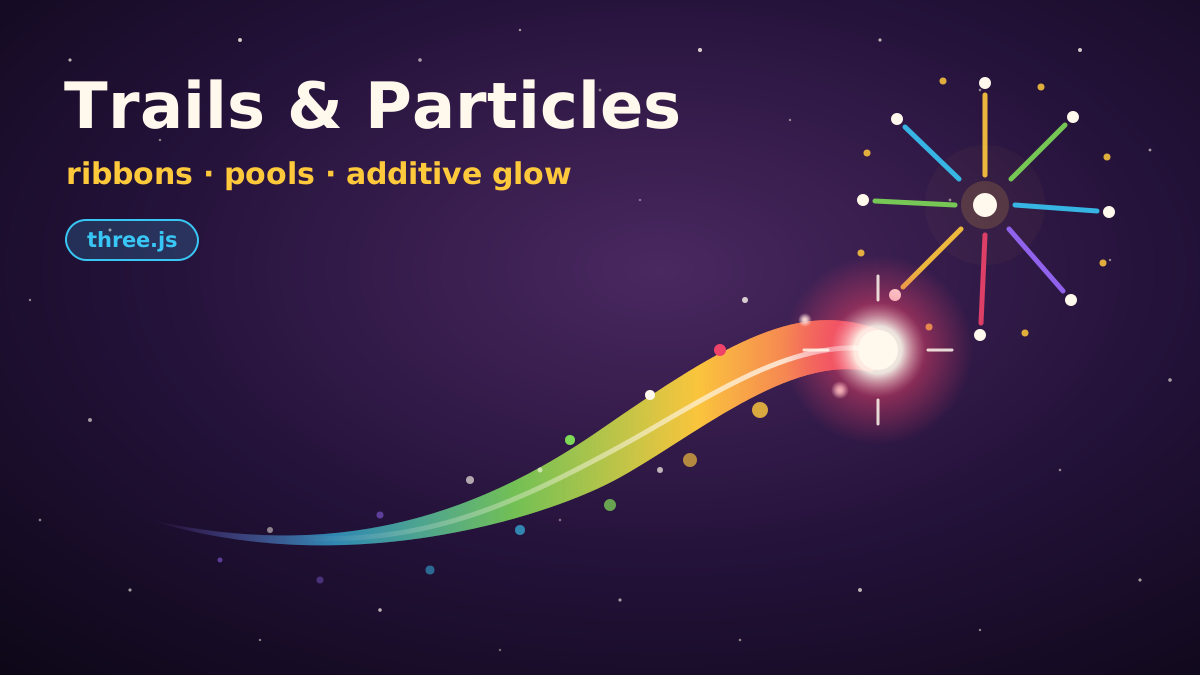
A jump that leaves a little puff of dust feels better than one that doesn't. A sword swing with a bright arc reads faster than one without, and a coin that bursts into sparkles when you grab it is more satisfying than one that just vanishes. None of these effects change the rules of the game, but they make the game feel more responsive. Players notice that, even when they couldn't tell you why.
This post walks through two of the most useful effects in our toolbox, built from scratch in three.js: a ribbon trail that follows a moving object, and a particle system for sparkles, sparks and firework bursts. No libraries beyond three.js, just BufferGeometry, a couple of tiny shaders and some careful bookkeeping. Here is the finished demo to play with first:
The glowing orb follows a Lissajous curve until you move the pointer over the scene, and then it chases you. Behind it there is a tapered, color-shifting ribbon, a stream of sparkles, and the occasional heavy spark that falls under gravity. Every click spawns a burst of 180 particles. The toolbar lets you switch the trail and particles on and off and change the emission rate, and the counter shows how much of the particle pool is in use.
Ribbon trails
A trail is a record of where something has been, drawn as a strip of triangles. That gives us three jobs: remember the recent positions, turn each position into two vertices, and stitch those vertices into triangles.

1. A ring buffer of positions
Every frame we push the orb's current position, color and timestamp. Using an array and calling unshift would work, but it shuffles memory around and creates garbage. A ring buffer just overwrites the oldest slot and moves a head index forward:
const TRAIL_CAP = 128;           // ring buffer capacity (samples)
const TRAIL_DURATION = 1.0;      // seconds a sample lives
const TRAIL_HALF_WIDTH = 0.26;   // world units at the head

const ringPos = new Float32Array(TRAIL_CAP * 3);
const ringCol = new Float32Array(TRAIL_CAP * 3);
const ringTime = new Float32Array(TRAIL_CAP);
let ringHead = -1;  // index of newest sample
let ringCount = 0;

function trailPush(p, color, time) {
  ringHead = (ringHead + 1) % TRAIL_CAP;
  const i3 = ringHead * 3;
  ringPos[i3] = p.x; ringPos[i3 + 1] = p.y; ringPos[i3 + 2] = p.z;
  ringCol[i3] = color.r; ringCol[i3 + 1] = color.g; ringCol[i3 + 2] = color.b;
  ringTime[ringHead] = time;
  ringCount = Math.min(ringCount + 1, TRAIL_CAP);
}
// k = 0 is the newest sample, k = ringCount - 1 the oldest
const ringIndex = k => (ringHead - k + TRAIL_CAP) % TRAIL_CAP;
Samples are time-stamped, so the trail shows the last second of motion whatever the frame rate. When the orb stops, the old samples age out and the trail shrinks back into the head, which is what you'd expect from a comet.
2. Geometry allocated once
The trail mesh never changes its buffers. We allocate room for TRAIL_CAP samples, two vertices each, and build the index buffer once at startup. Each segment between sample k and k + 1 is a quad made of two triangles, (a, b, c) and (b, d, c). The aSide attribute is +1 or −1 so the fragment shader knows which edge a pixel is near.
const trailGeo = new THREE.BufferGeometry();
const trailPos = new Float32Array(TRAIL_CAP * 2 * 3);
const trailCol = new Float32Array(TRAIL_CAP * 2 * 3);
const trailAlpha = new Float32Array(TRAIL_CAP * 2);
const trailSide = new Float32Array(TRAIL_CAP * 2);
for (let i = 0; i < TRAIL_CAP; i++) { trailSide[i * 2] = 1; trailSide[i * 2 + 1] = -1; }

const trailIdx = new Uint16Array((TRAIL_CAP - 1) * 6);
for (let i = 0; i < TRAIL_CAP - 1; i++) {
  const a = i * 2, b = a + 1, c = a + 2, d = a + 3;
  trailIdx.set([a, b, c, b, d, c], i * 6); // runs once at startup
}
trailGeo.setIndex(new THREE.BufferAttribute(trailIdx, 1));

const trailPosAttr = new THREE.BufferAttribute(trailPos, 3).setUsage(THREE.DynamicDrawUsage);
trailGeo.setAttribute('position', trailPosAttr);
trailGeo.setAttribute('aColor', trailColAttr);   // same pattern
trailGeo.setAttribute('aAlpha', trailAlphaAttr); // same pattern
trailGeo.setAttribute('aSide', new THREE.BufferAttribute(trailSide, 1));
DynamicDrawUsage tells WebGL we will rewrite these buffers often. Each frame we only fill in the first 2n vertices and draw 6(n − 1) indices with setDrawRange. The rest of the buffer sits there unused, so no allocation and no setAttribute call is needed after startup.
3. Camera-facing, tapered, fading
To turn a line of points into a ribbon, each sample needs a side vector to offset its two vertices along. If you used a fixed axis such as world up, the ribbon would turn edge-on and vanish whenever the orb moved along that axis. Instead we take the cross product of the trail direction and the direction to the camera. The result is perpendicular to both, so the ribbon always shows its flat face to the viewer, even when the orb dives toward or away from the camera on its z wobble.
function updateTrail(now) {
  // drop samples older than TRAIL_DURATION
  while (ringCount > 0 && now - ringTime[ringIndex(ringCount - 1)] > TRAIL_DURATION) ringCount--;

  const n = ringCount;
  for (let k = 0; k < n; k++) {
    readRing(k, _p);
    readRing(Math.max(k - 1, 0), _prev);
    readRing(Math.min(k + 1, n - 1), _next);

    // direction along the trail and a camera-facing side vector
    _dir.subVectors(_prev, _next);
    _toCam.subVectors(camera.position, _p);
    _side.crossVectors(_dir, _toCam);
    const len = _side.length();
    if (len > 1e-6) { _side.divideScalar(len); _lastSide.copy(_side); }
    else _side.copy(_lastSide); // degenerate (orb not moving): reuse last side

    // age 0 at the head, 1 at the tail
    const ri = ringIndex(k);
    const u = Math.min((now - ringTime[ri]) / TRAIL_DURATION, 1);
    const width = TRAIL_HALF_WIDTH * Math.pow(1 - u, 0.8);  // taper
    const alpha = Math.pow(1 - u, 1.6);                       // fade

    const v = k * 2, o = v * 3;
    trailPos[o]     = _p.x + _side.x * width;
    trailPos[o + 1] = _p.y + _side.y * width;
    trailPos[o + 2] = _p.z + _side.z * width;
    trailPos[o + 3] = _p.x - _side.x * width;
    trailPos[o + 4] = _p.y - _side.y * width;
    trailPos[o + 5] = _p.z - _side.z * width;
    // ...copy ringCol into trailCol for both vertices...
    trailAlpha[v] = trailAlpha[v + 1] = alpha;
  }

  trailGeo.setDrawRange(0, Math.max(n - 1, 0) * 6);
  trailPosAttr.needsUpdate = true;
  trailColAttr.needsUpdate = true;
  trailAlphaAttr.needsUpdate = true;
}
A few details in there do a lot of the work:
- Central differences. The direction at sample
kisp[k−1] − p[k+1], which gives smoother corners than a one-sided difference. - Degenerate frames. When the orb stands still the direction is zero and so is the cross product. Normalizing it would produce
NaNs, so we reuse the previous side vector instead. - Age drives everything.
uruns from 0 at the head to 1 at the tail. The width shrinks with(1 − u)^0.8and the alpha fades faster with(1 − u)^1.6, so the tail thins out and disappears instead of ending in a hard edge. - Scratch vectors.
_p,_dir,_sideand the rest are created once at module level. Nothing in this loop allocates.
The material is a small ShaderMaterial. The fragment shader adds a soft fade across the ribbon's width using aSide, plus a thin bright core, which makes a flat strip look like a beam of light:
const trailMat = new THREE.ShaderMaterial({
  vertexShader: /* glsl */ `
    attribute vec3 aColor;
    attribute float aAlpha;
    attribute float aSide;
    varying vec3 vColor;
    varying float vAlpha;
    varying float vSide;
    void main() {
      vColor = aColor; vAlpha = aAlpha; vSide = aSide;
      gl_Position = projectionMatrix * modelViewMatrix * vec4(position, 1.0);
    }`,
  fragmentShader: /* glsl */ `
    varying vec3 vColor;
    varying float vAlpha;
    varying float vSide;
    void main() {
      float edge = 1.0 - vSide * vSide;           // 1 in the middle, 0 at the edges
      float core = pow(edge, 6.0) * 0.7;          // bright center line
      gl_FragColor = vec4(vColor + core, edge * vAlpha);
    }`,
  transparent: true,
  depthWrite: false,
  side: THREE.DoubleSide,
  blending: THREE.AdditiveBlending,
});
A particle system on a budget
The particles use THREE.Points: one vertex per particle, drawn as a screen-aligned square that the fragment shader turns into a soft round sprite. Every particle lives in one BufferGeometry with four attributes (position, aColor, aSize, aAlpha), so thousands of sparkles cost a single draw call.

Soft round sprites with size attenuation
The built-in PointsMaterial can't vary size or alpha per particle, so we write our own. The vertex shader scales gl_PointSize by distance so sizes behave like world units, and the fragment shader uses gl_PointCoord to draw a radial falloff with a hot center:
attribute float aSize;
attribute float aAlpha;
attribute vec3 aColor;
uniform float uScale;
varying vec3 vColor;
varying float vAlpha;
void main() {
  vColor = aColor;
  vAlpha = aAlpha;
  vec4 mv = modelViewMatrix * vec4(position, 1.0);
  // size is in world units: perspective size attenuation
  gl_PointSize = aSize * uScale / -mv.z;
  gl_Position = projectionMatrix * mv;
}

// --- fragment shader ---
varying vec3 vColor;
varying float vAlpha;
void main() {
  float d = length(gl_PointCoord - 0.5) * 2.0;  // 0 center, 1 edge
  float glow = smoothstep(1.0, 0.0, d);
  glow *= glow;                                  // soft falloff
  float core = smoothstep(0.35, 0.0, d);         // hot white center
  gl_FragColor = vec4(vColor + core * 0.6, glow * vAlpha);
}
uScale converts world units to pixels. It is the canvas height in device pixels divided by 2 · tan(fov / 2), and it is recomputed on resize, so a particle with aSize = 0.2 covers 0.2 world units at any resolution or pixel ratio.
A fixed-size pool with swap-remove
The simplest particle system pushes objects into an array and splices them out when they die. In a game that creates garbage every frame, and eventually the garbage collector pauses to clean it up, often in the middle of the action. So we allocate everything up front as flat typed arrays, and live particles always occupy slots 0 to alive − 1.
const MAX_PARTICLES = 4000;

// GPU-facing attributes
const pPos = new Float32Array(MAX_PARTICLES * 3);
const pCol = new Float32Array(MAX_PARTICLES * 3);
const pSize = new Float32Array(MAX_PARTICLES);
const pAlpha = new Float32Array(MAX_PARTICLES);
// CPU-only simulation state
const pVel = new Float32Array(MAX_PARTICLES * 3);
const pTint = new Float32Array(MAX_PARTICLES * 3);
const pAge = new Float32Array(MAX_PARTICLES);
const pLife = new Float32Array(MAX_PARTICLES);
// ...pBase (size), pGrav, pDrag...
let alive = 0;

function spawn(x, y, z, vx, vy, vz, life, size, color, gravity, drag) {
  if (alive >= MAX_PARTICLES) return false; // pool full: drop the request
  const i = alive++, i3 = i * 3;
  pPos[i3] = x; pPos[i3 + 1] = y; pPos[i3 + 2] = z;
  pVel[i3] = vx; pVel[i3 + 1] = vy; pVel[i3 + 2] = vz;
  pTint[i3] = color.r; pTint[i3 + 1] = color.g; pTint[i3 + 2] = color.b;
  pAge[i] = 0; pLife[i] = life; pBase[i] = size;
  pGrav[i] = gravity; pDrag[i] = drag;
  return true;
}

// Move the last live particle into slot i (O(1) removal, keeps [0, alive) packed)
function kill(i) {
  const last = --alive;
  if (i === last) return;
  const i3 = i * 3, l3 = last * 3;
  for (let k = 0; k < 3; k++) {
    pPos[i3 + k] = pPos[l3 + k];
    pVel[i3 + k] = pVel[l3 + k];
    pTint[i3 + k] = pTint[l3 + k];
  }
  pAge[i] = pAge[last]; pLife[i] = pLife[last]; pBase[i] = pBase[last];
  pGrav[i] = pGrav[last]; pDrag[i] = pDrag[last];
}
Removing a particle is O(1): copy the last live particle into the hole and decrement alive. Order doesn't matter for additive particles (more on that below), so we never have to shift anything. When the pool is full, spawn simply refuses. On a busy frame you lose a few sparkles, which nobody will notice, instead of growing an array.
The update loop
Every frame each particle ages, gets gravity and drag, moves, and then has its look recomputed from t = age / life. Notice the continue after kill(i): slot i now holds a different particle that hasn't been updated yet, so we must not advance the index.
function updateParticles(dt) {
  let i = 0;
  while (i < alive) {
    pAge[i] += dt;
    const t = pAge[i] / pLife[i];
    if (t >= 1) { kill(i); continue; } // don't advance: slot i now holds a new particle

    const i3 = i * 3;
    const damp = Math.exp(-pDrag[i] * dt);   // frame-rate independent drag
    pVel[i3 + 1] += pGrav[i] * dt;           // gravity on Y
    pVel[i3] *= damp; pVel[i3 + 1] *= damp; pVel[i3 + 2] *= damp;
    pPos[i3] += pVel[i3] * dt;
    pPos[i3 + 1] += pVel[i3 + 1] * dt;
    pPos[i3 + 2] += pVel[i3 + 2] * dt;

    // appearance over life
    const grow = Math.min(t * 8, 1);                 // pop in quickly
    pSize[i] = pBase[i] * grow * (1 - t);            // then shrink
    pAlpha[i] = 1 - t * t;                           // fade out late
    const hot = Math.max(1 - t * 3, 0);              // starts cream-hot, cools to tint
    pCol[i3]     = pTint[i3]     + (CREAM.r - pTint[i3])     * hot;
    pCol[i3 + 1] = pTint[i3 + 1] + (CREAM.g - pTint[i3 + 1]) * hot;
    pCol[i3 + 2] = pTint[i3 + 2] + (CREAM.b - pTint[i3 + 2]) * hot;
    i++;
  }
  partGeo.setDrawRange(0, alive);
  pPosAttr.needsUpdate = pColAttr.needsUpdate = pSizeAttr.needsUpdate = pAlphaAttr.needsUpdate = true;
}
Drag uses Math.exp(-drag * dt) rather than 1 - drag * dt, so it behaves the same at 30 fps and 144 fps. The appearance curves are deliberately simple. Particles pop in over the first eighth of their life, shrink linearly, hold their alpha until late, and start cream-white before cooling to their tint. That last trick makes fresh particles look hot and older ones look like embers.
Emitters: streams, sparks and bursts
An emitter is just a function that calls spawn with sensible random ranges. The demo has three:
- Continuous along the trail. A rate in particles per second, with a fractional carry so 180/s at 144 fps still works out right. Spawn positions are spread randomly between last frame's position and this one, so a fast-moving orb leaves an even line instead of clumps.
- Sparks. Every now and then a few small, fast, mango-colored particles with strong gravity, for some extra variety.
- Bursts. On click or tap: one big short-lived flash plus 180 particles in random directions, colored between two random palette colors and pulled down by gravity like a firework.
let emitCarry = 0;
function emitAlongTrail(dt, from, to, vel, baseColor, rate) {
  emitCarry += rate * dt;
  const n = Math.floor(emitCarry);
  emitCarry -= n;
  for (let k = 0; k < n; k++) {
    const f = Math.random();   // spread spawns between last and current position
    randomDir(_dir).multiplyScalar(rand(0.1, 0.5));
    _c.copy(baseColor);
    if (Math.random() < 0.3) _c.lerp(PALETTE[(Math.random() * PALETTE.length) | 0], 0.6);
    spawn(
      from.x + (to.x - from.x) * f + rand(-0.06, 0.06),
      from.y + (to.y - from.y) * f + rand(-0.06, 0.06),
      from.z + (to.z - from.z) * f,
      _dir.x - vel.x * 0.12, _dir.y - vel.y * 0.12, _dir.z - vel.z * 0.12,
      rand(0.5, 1.2), rand(0.06, 0.16), _c, -0.8, 1.2,
    );
  }
}

function burst(x, y, z) {
  const a = PALETTE[(Math.random() * PALETTE.length) | 0];
  const b = PALETTE[(Math.random() * PALETTE.length) | 0];
  spawn(x, y, z, 0, 0, 0, 0.25, 2.2, CREAM, 0, 0);   // one bright flash
  for (let k = 0; k < 180; k++) {
    randomDir(_dir).multiplyScalar(rand(2.5, 5.5));
    _c2.lerpColors(a, b, Math.random());
    spawn(x, y, z, _dir.x, _dir.y + 1.2, _dir.z, rand(1.0, 1.8), rand(0.14, 0.3), _c2, -4.5, 1.4);
  }
}
Subtracting a bit of the orb's velocity (vel.x * 0.12) makes the sparkles drift backwards relative to the motion, which sells the feeling of speed. The _c, _c2 and _dir objects are reused scratch values. Calling new THREE.Color() per particle would undo all the work we put into the pool.
Additive glow, depth and sorting
Both materials use blending: THREE.AdditiveBlending and depthWrite: false, and those two settings are what make the effect glow:
- Additive blending adds each fragment's color to what is already there. Where particles overlap they get brighter and drift toward white, which is how light behaves and why the burst cores bloom without any post-processing. It looks best on a dark background, which is why the demo is set at night.
- Addition is commutative, so draw order doesn't matter. Normal alpha-blended particles must be sorted back to front every frame or they look wrong. Additive ones can be drawn in any order, which is what lets us swap-remove freely.
depthWrite: falsestops each sprite from writing its square into the depth buffer. Without it, a sprite drawn first would hide the soft edges of sprites behind it and you would see dark square cut-outs. Depth testing stays on, so solid geometry in front still hides the particles.
The caveat: additive blending can only brighten. Smoke, dust on a bright background or anything that should darken the scene needs normal blending, and then you are back to sorting (or living with occasional artifacts). Many games use both: additive for fire, magic and sparks, and sorted alpha for smoke.
Frame time and performance
A few habits keep effects like these cheap and stable:
renderer.setPixelRatio(Math.min(window.devicePixelRatio || 1, 2)); // cap DPR at 2

function frame() {
  rafId = requestAnimationFrame(frame);
  const dt = Math.min(clock.getDelta(), 1 / 30); // clamp: no giant steps after a hitch
  // ...steer orb, push trail, emit, update, render...
}

// pause when the tab is hidden
document.addEventListener('visibilitychange', () => {
  if (document.hidden) { cancelAnimationFrame(rafId); rafId = 0; }
  else if (!rafId) { clock.getDelta(); frame(); }
});
- Clamp delta time. If the tab stalls for half a second, an unclamped
dtsends every particle flying through one giant step. Clamping to 1/30 s means a hitch looks like a short slow-down instead. - Pause when hidden. Browsers already throttle background tabs, but stopping the loop on
visibilitychangesaves the battery entirely, and resetting the clock on return avoids a huge first frame. - Cap the pixel ratio. Phones report a DPR of 3 or more. Going from 2 to 3 more than doubles the pixels the fragment shader fills, and with lots of overlapping additive sprites, fill rate is usually the first thing to run out.
- Budget your counts. Particle cost is mostly overdraw, not vertex count: a few hundred large soft sprites can cost more than thousands of tiny ones. Keep sprites small, keep lifetimes short, and pick a smaller pool and emission rate on mobile.
- Throttle the UI. The particle counter in the demo updates four times a second, not every frame. Touching the DOM is not free either.
- Turn off frustum culling on these objects (
frustumCulled = false). Their bounds change every frame, and a stale bounding sphere can cull the whole trail when it is clearly on screen.
One embedding detail: the canvas uses touch-action: pan-y and never calls preventDefault on wheel events, so when the demo is inside this article you can still scroll past it on a phone.
Where to take it next
Everything here is plain arrays and a couple of shaders, so it is easy to extend. You could move the particle simulation into the vertex shader (pass the spawn time and initial velocity, and compute the position from the age), add a texture atlas for star or petal shapes, or attach trails to every projectile in your game. Whatever you add, keep the same rules: allocate once, reuse everything, and let addition do the glowing.

Comments
Loading comments…