
We make Shiftly: Shift & Pay Tracker at NabiGame; this guide explains it and the topic, it is not an independent review. Shiftly helps hourly workers record shifts, track hours and estimate gross pay from their own settings. Use it as a personal record alongside your payslip, with overtime rules checked for your location and employment situation.
Key takeaways
- Record actual start times, finish times and breaks; a planned shift is not proof of hours worked.
- Overtime depends on coverage, the applicable workweek, the regular rate and local rules.
- Shiftly estimates pay and supports comparison with pay received; it does not run payroll.
- Work records stay on your device, but offline tracking does not mean the app has no advertising or analytics.
Why track your own shifts and hours?
A personal timesheet gives you something specific to check when a payslip looks unfamiliar. Instead of relying on memory, record when you started, when you finished, which job you worked and what happened during breaks. Our rule of thumb is to record the work while you still remember it, then review the entries before comparing pay.
Keep scheduled time separate from actual time. If a shift finishes late, preserve the real finish time and add a short factual note. If you forget to stop a timer, correct the entry rather than treating the running total as evidence. A useful record should explain what happened, including corrections.
Shiftly suits people who want a personal log across changing schedules or several jobs. Its calendar, timesheet and earnings views serve different questions: what is planned, what happened and what the configured rules estimate. You can find it on our Shiftly app page.
How is overtime typically calculated?
The following is a general explanation of United States guidance checked on November 16, 2026, not a decision about anyone’s entitlement. Rules vary by country and state, and exemptions matter. Confirm your situation with the relevant labor authority or a qualified adviser before treating an app setting as a legal rule.
Start with the workweek, not the payday
Under U.S. Department of Labor guidance checked in 2026, covered, nonexempt employees generally receive at least time and one-half their regular rate for hours worked over 40 in a workweek. The workweek can begin on a day other than the calendar week’s start. A pay period and an overtime workweek therefore need separate attention.
“Averaging of hours over two or more weeks is not permitted.”
— U.S. Department of Labor, Wage and Hour Division, Overtime Pay
That statement, checked in 2026, means a quiet week cannot simply cancel overtime from a busier week under this general federal rule. Ask payroll which workweek boundary applies. When reviewing Shiftly, check its first-day-of-week setting separately from the job’s pay-period dates; matching the payday alone is not enough.
Use the regular rate, not automatically the base rate
The Department’s regular-rate fact sheet, published in 2019 and checked in 2026, explains that the calculation uses compensation included under the law divided by hours actually worked. Statutory exclusions apply. A simple hourly wage can be straightforward; additional compensation requires more care.
“The regular rate of pay is based upon actual facts and cannot be circumvented by an agreement.”
— U.S. Department of Labor, Wage and Hour Division, Overview of the Regular Rate of Pay
For a straightforward hourly arrangement without extra compensation, the conceptual estimate is regular hours multiplied by the applicable rate, plus overtime hours multiplied by the applicable overtime rate. This is a starting model, not a universal payroll formula. Ask how bonuses or shift differentials affect your regular rate instead of assuming the rate printed beside your job title is sufficient.
Check state rules and exceptions
California’s official guidance, checked in 2026, illustrates why a federal weekly setting is not universal. Its general rules include daily overtime after eight hours and double time beyond 12 hours in a workday, alongside weekly and consecutive-day provisions. Exemptions and exceptions apply, so a daily threshold alone does not reproduce the whole system.
“There are also a number of exceptions to the general overtime law stated above.”
— California Department of Industrial Relations, Labor Commissioner’s Office, Overtime FAQ
Also distinguish contractual premiums from statutory overtime. Federal guidance checked in 2026 does not make weekend or holiday work automatically overtime merely because of the day. An employer’s agreement or another applicable rule may provide additional pay. Record the arrangement you have verified rather than choosing settings because they sound customary.
What Shiftly does and does not do
Shiftly’s Google Play listing, checked in November 2026, describes personal shift tracking and estimated earnings. Our review of the app source confirms the following tools:
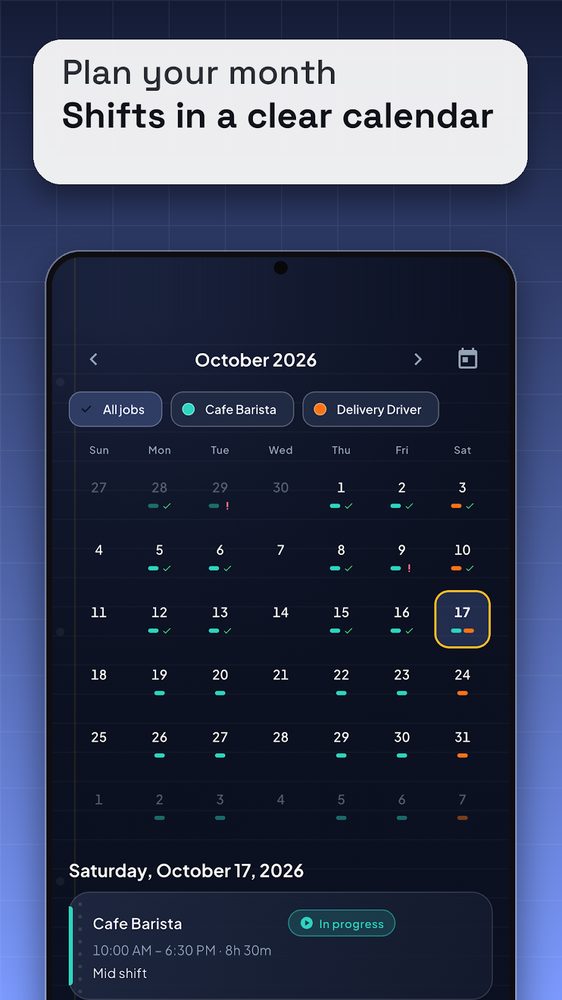
- Planning: a calendar with job colors, templates, overnight shifts and repeating schedules.
- Recording: start and end controls, breaks, manual session edits and notes, with scheduled-versus-worked comparisons.
- Estimating: job-specific rates and currencies, daily or weekly overtime settings, and night, weekend and holiday premiums.
- Reviewing: earnings by pay period, a comparison with pay received, CSV and PDF exports, and local backup and restore.
Our honest limit is estimates, not payroll/accounting/investment advice. The store listing makes the practical boundary explicit:
“They are not payroll, tax or legal advice, so always check your payslip.”
— NabiGame Studio, App publisher, Google Play
The current calculation model has limits worth knowing before setup. Premiums do not stack: holiday takes priority over weekend, then night, while overtime uses only the overtime multiplier. The app assigns a session’s workday from its local start date and accumulates overtime separately by job. It does not automatically reproduce every employer’s workday boundary, combined-employment calculation or tiered overtime arrangement.
For complicated arrangements, use Shiftly to preserve hours and notes, then verify the pay calculation separately. We would recommend an employer’s approved payroll process for official submissions and a personal tracker for your own comparison. A spreadsheet is another option if you prefer maintaining and checking formulas yourself.
Real examples
These are made-up people with round numbers, worked through the app’s own calculation order (unpaid breaks removed first, then regular versus overtime minutes, then one premium at most, rounded per line). Your rates and rules will differ.
Maria, café barista: 41 hours in one week
Setup: job “Cafe Barista”, $18.00 per hour, weekly overtime after 40 hours, multiplier 1.5, week starting Monday. She works Monday to Thursday 8 payable hours each, and Friday 10:00 AM to 7:30 PM with a 30-minute unpaid break.
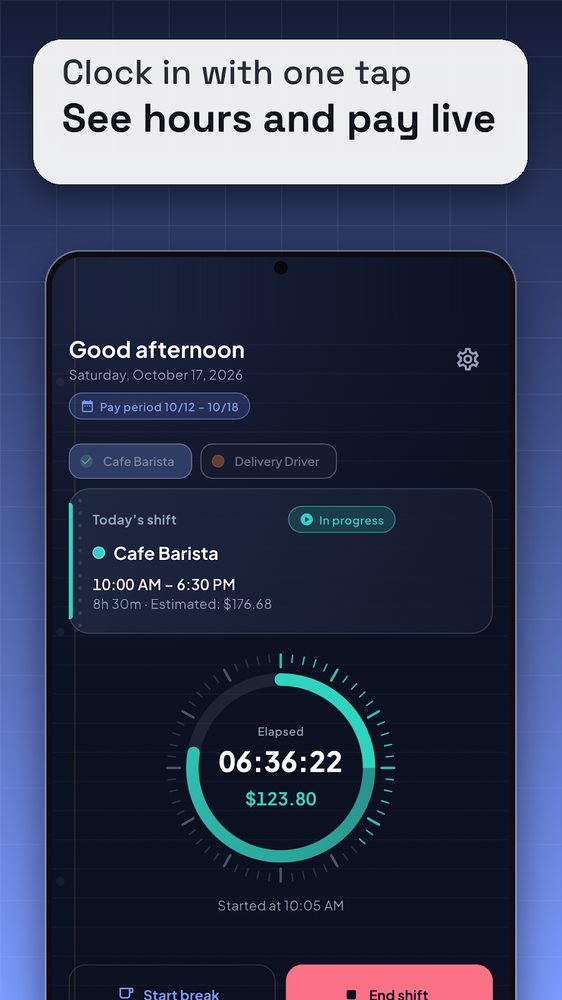
- Each shift, she taps clock in on the Home screen (first screenshot) and watches the timer and pay count up.
- On Friday she taps Start break at lunch and ends it 30 minutes later, then taps End shift at 7:30 PM.
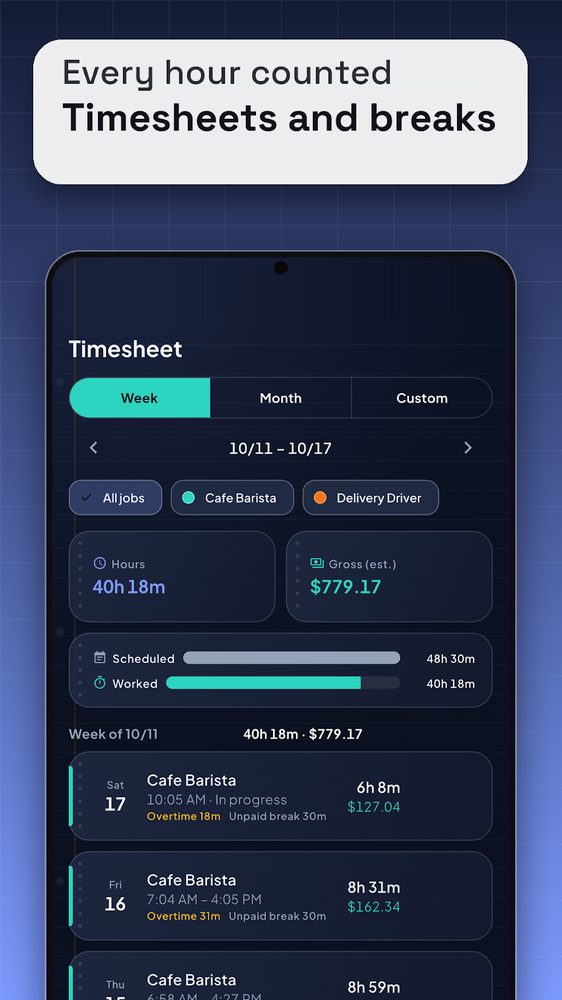
- In the Timesheet (third screenshot) Friday’s row carries an overtime label and an unpaid-break label, as the rows in that screenshot do.
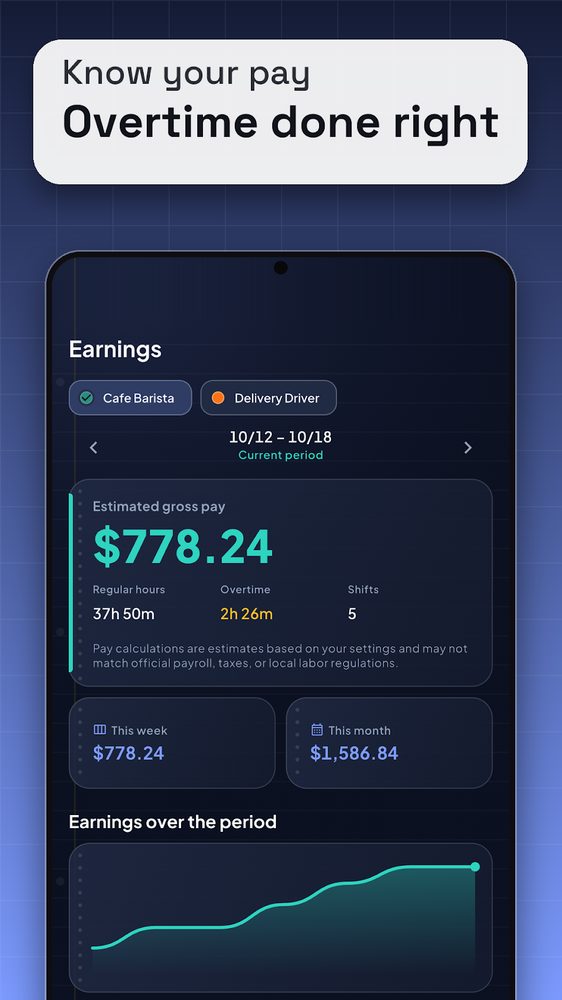
Outcome: 32 hours before Friday leaves 8 regular hours, so 1 of Friday’s 9 hours is overtime. Estimate: 40 × $18.00 = $720.00 plus 1 × $27.00 = $27.00, total $747.00 gross. The Earnings screen (fourth screenshot) shows the split as 40h regular, 1h overtime, 5 shifts.
Jake, two jobs: café on weekdays, delivery on Saturday
Setup: job “Cafe Barista” at $20.00 per hour with weekly overtime after 40 hours, and job “Delivery Driver” at $15.00 per hour with a +25% weekend premium (Saturday and Sunday are the default weekend days).
- He adds both jobs in Settings; each gets its own color, which then shows in the Calendar (second screenshot).
- Monday to Friday he works 8 payable hours at the café: 40h × $20.00 = $800.00, exactly at the threshold, so no overtime.
- Saturday 10:00 AM to 4:00 PM he drives: 6h × $15.00 × 1.25 = $112.50.
- On the Earnings screen he leaves “All jobs” selected for the total, or taps one job chip to see it alone.
Outcome: $912.50 estimated gross for the week. Because Shiftly counts overtime per job, the 46 combined hours do not trigger overtime in the app. Whether hours at two jobs must legally be combined depends on whether one employer is involved and on local rules, so check that outside the app.
Dan, night warehouse shift: overnight hours and a payslip check
Setup: $16.00 per hour, night premium +25% (the default night window is 10:00 PM to 6:00 AM), no overtime thresholds. He works 8:00 PM to 4:30 AM, five nights, with a 30-minute unpaid break at midnight.
- He starts the shift at 8:00 PM on Home and ends it at 4:30 AM; the shift belongs to the day it started.
- Per shift: 8h payable. 2h before 10:00 PM at base rate = $32.00; 6h in the night window (the break falls inside it) at $16.00 × 1.25 = $120.00. Total $152.00, and five shifts make $760.00.
- At the end of the period he opens Compare with pay received from Earnings and enters: received $610.00, deductions $120.00.
- Expected = $760.00 − $120.00 = $640.00; difference = $610.00 − $640.00 = −$30.00.
- He exports the period as CSV or PDF and asks payroll about those specific shifts.
Outcome: a concrete, checkable $30.00 question instead of a vague feeling. A difference alone does not prove underpayment, and the app says so when you enter no deductions.
How Shiftly differs from other apps
We make Shiftly, so read these as checkable facts about how it is built, not as a ranking.
- No account, no signup. Many employer or workforce apps (scheduling suites such as the ones your manager assigns) need a login tied to the company. Shiftly needs no login; core features work offline.
- Records stay on the phone. Jobs, shifts and notes live in a local database; there is no server copy and no cloud backup. The upside is that no company holds your hours. The cost is that you must save backups yourself, otherwise a lost phone loses the data.
- Overtime and premiums are job settings. Daily and weekly thresholds, a 1.0x to 5.0x multiplier, night, weekend and holiday premiums, and automatic unpaid breaks are all job settings. Check the feature list of any alternative you consider, since we have not audited other apps.
- History is not rewritten. Each session stores a snapshot of the job’s rate and rules when it starts, so raising your hourly rate later does not change last month’s estimate.
- Whole-number math. Money is calculated in integer minor units and rounded per line, rather than with floating-point totals, so the same inputs always give the same estimate.
- Reconciliation built in. You can compare an estimate with pay received, including deductions and bonuses, instead of only viewing totals.
When to pick something else
- Your employer requires its own clock-in system, GPS verification or manager approval; Shiftly is personal and cannot be submitted as official time.
- You need sync across several devices or an automatic cloud backup; Shiftly has neither.
- You need tiered overtime, combined hours across employers or an employer-specific workday boundary; it does not model these, and a spreadsheet or an accountant may fit better.
- You want an ad-free experience: the app shows ads and includes advertising and analytics code, with consent handling.
How do you get started in 3 steps?
- Set up a job from verified information. Enter its currency, hourly rate and pay period. Check overtime thresholds, the multiplier, premiums and break policy against your agreement and applicable guidance. Review the app’s week-start setting. If a rule cannot be represented faithfully, note that limitation before relying on the estimate.
- Record an actual work session. Start tracking when work begins, record breaks accurately and end the session when work finishes. Use the timesheet to correct missed actions and add useful context. Check the job and dates carefully for overnight work; the planned calendar entry and the completed session answer different questions.
- Review, compare and save. Check the timesheet before opening the earnings summary. Compare matching periods and matching pay concepts, enter known adjustments where appropriate, then export a report or create a backup. Keep your payslip alongside the record so a later question has supporting detail.
Why can estimated pay differ from your payslip?
Shiftly’s earnings estimate is gross pay. The reconciliation screen lets you enter pay received, known deductions and bonuses or adjustments. Its source explicitly warns that comparing take-home pay with gross pay can create a difference without establishing underpayment. Adding an adjustment also does not automatically recalculate every legal consequence of that payment.
Our recommended review order is dates, hours, breaks, rates, then adjustments. Confirm that both records cover the same period. Look for an unfinished timer, a missed session or a break recorded incorrectly before examining the pay rules. Then compare gross with gross, or reconcile the known deductions before comparing with take-home pay.
If a difference remains, export the relevant entries and ask payroll to explain the specific line. Keep the question factual: which hours, which rate and which period need clarification? Preserve the original payslip. A tracker helps organize the discussion; its total alone does not settle a wage dispute.
Is offline shift tracking private?
The local source and Play listing confirm that Shiftly works offline without an account. Jobs, shifts, hours, rates and notes are stored on the device; the app has no server for those work records. Exports and backups are created locally, and sharing a file sends it to the destination you choose.
That is narrower than saying nothing ever leaves the phone. The source includes Google advertising and usage analytics, with consent handling, and the listing identifies ads. During our November 2026 check, Play’s Data safety section said no data was collected, while the app’s own privacy text described usage statistics. Those descriptions need reconciliation; we cannot promise zero collection.
Our recommendation is to protect the phone and treat exported reports as personal documents. Check the recipient before sharing, and keep backups somewhere you control. Local storage also makes your backup choices important: do not assume an account login will restore work records after changing devices.
Explore our apps and community tools for more practical utilities. Our preference for clear limits also informs how we discuss development services. If a Shiftly setting or explanation is unclear, contact NabiGame Studio with the question, leaving private payslip details out of the initial message.
FAQ
Can Shiftly calculate my exact take-home pay?
No. It estimates gross pay from your settings and supports comparison using entered adjustments. It does not automatically calculate your taxes or reproduce every payroll rule.
Does a long shift always qualify for overtime?
No universal rule applies everywhere. Coverage, location, workweek and daily rules can change the answer; the federal and California guidance linked above illustrate that difference.
Can I track several jobs?
Yes, Shiftly supports separate jobs with their own rates, currencies and rules. Its overtime accumulation is per job, so do not assume it resolves situations where hours must legally be considered together.
Does Shiftly require an internet connection or account?
Core tracking works offline without an account. Ads and analytics are separate from locally stored work records, so offline functionality should not be read as a zero-collection guarantee.
Can I export my hours for a payroll question?
Yes, Shiftly supports CSV and PDF reports. Check the selected period and entries before sharing, and include your question rather than assuming an exported estimate proves an error.
Sources
- U.S. Department of Labor: Overtime Pay — checked November 16, 2026.
- U.S. Department of Labor: Overview of the Regular Rate of Pay — December 2019; checked November 16, 2026.
- California Department of Industrial Relations: Overtime FAQ — checked November 16, 2026.
- Shiftly: Shift & Pay Tracker on Google Play — checked November 16, 2026.


Comments
Loading comments…