
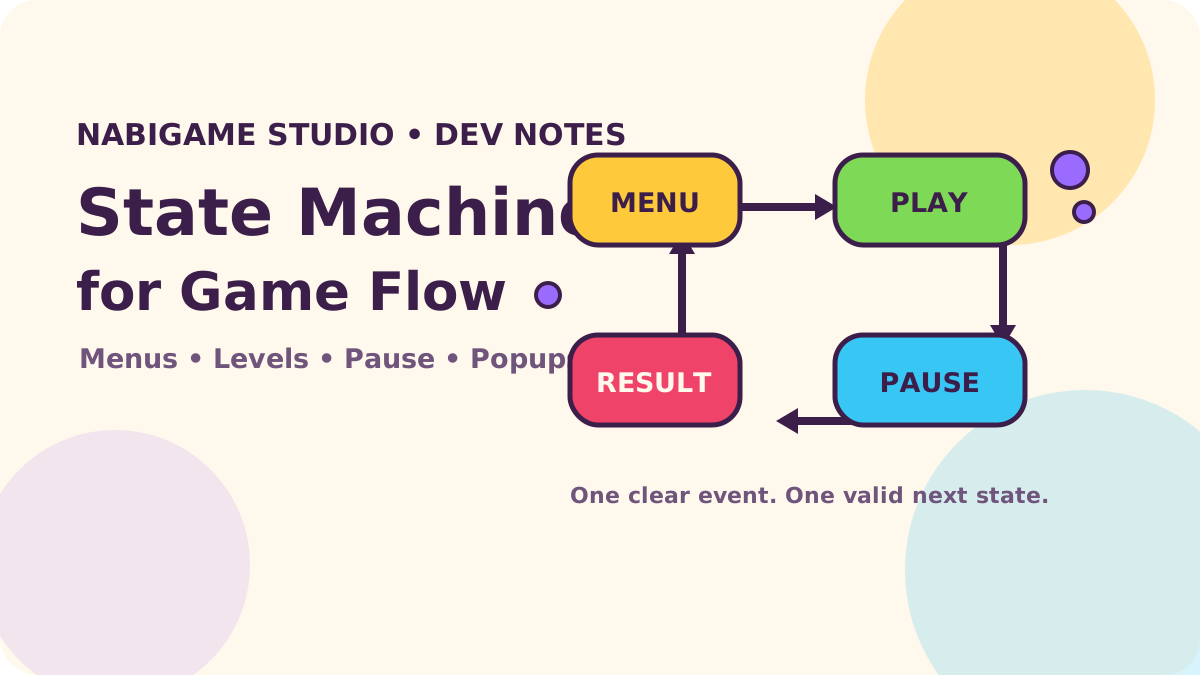
A state machine makes casual game flow easier to reason about by naming the modes your game can occupy and the events that move it between them. Instead of letting unrelated booleans decide whether a level, pause screen, ad, or popup is active, define valid transitions and route every interruption through them. That gives a small team a practical way to prevent impossible screens and test the moments players actually encounter.
Key takeaways
- Use one authoritative flow state for mutually exclusive modes such as menu, playing, paused, and results.
- Use nested states when a mode has meaningful substates, and a separate popup stack for overlays that can layer.
- Treat tab hiding, ad presentation, and returning from the operating system as events with explicit resume rules.
- Keep transitions pure enough to test without rendering the whole game.
Why do UI booleans rot?
A prototype often starts with isPlaying, isPaused, showSettings, and isGameOver. Each flag is easy to add, but every new feature creates combinations. Is the game paused while the result panel is open? Can settings remain visible behind a confirm dialog? Does an ad return to the menu or the exact board state? Independent booleans do not answer those questions; each click handler quietly invents its own answer.
Imagine three flags for playing, paused, and game over. There are eight possible combinations, although only a few make sense. Add two popup flags and the combinations grow again. The issue is not that booleans are inherently bad. They work well for independent facts, such as whether music is muted. They are a poor representation of mutually exclusive modes.
In our experience, the most useful design question is: “What must be true for this input to be accepted right now?” A state machine puts that rule near the transition instead of scattering it across rendering code, touch handlers, and ad callbacks.
What is a finite state machine?
A finite state machine (FSM) is a named set of states plus transitions triggered by events. For a compact puzzle game, a top-level flow might be menu, playing, paused, results, and loading. A transition such as START changes menu to playing; a LEVEL_WON event changes playing to results.
These are states of the game’s flow, not every value in the game. The board’s tile positions, score, selected level, and audio preference belong in ordinary game data. Keep the machine responsible for deciding which actions and screens are currently valid. The puzzle game design guide covers the player-facing loop; this article focuses on coordinating its screens and interruptions.
“A state machine can only be in one state at a time.”
— Stately, State
Start with a small, explicit flow
List states before writing transition code. Then list events players or systems can send, and decide where each event is accepted. The simple map below is deliberately small; add a state only when it changes allowed behavior, visible UI, or cleanup responsibilities.
const transitions = {
  menu:    { START: "playing" },
  playing: { PAUSE: "paused", LEVEL_WON: "results" },
  paused:  { RESUME: "playing", QUIT: "menu" },
  results: { NEXT: "playing", HOME: "menu" }
};

let state = "menu";
function send(event) {
  const next = transitions[state]?.[event];
  if (!next) return false;
  state = next;
  renderFlow(state);
  return true;
}
This tiny implementation intentionally ignores effects, animation timing, and context. It demonstrates the key property: an unknown event in the current state is rejected. In production, decide whether rejection should be silent, logged in development, or reported to analytics. Do not “fix” a rejected event by making every button transition from everywhere; the rejection may expose a real race.
Keep side effects at the edges. A transition can choose the next state, while a renderer shows the matching screen and a service handles audio, persistence, or ad SDK work. For example, entering paused may stop the simulation and duck music; resuming may reset the frame delta so a long pause does not become one enormous physics step. For save data, see our web game save systems guide.
When should the machine be hierarchical?
A flat FSM is easy to read when the number of modes is small. As the game grows, it becomes repetitive to repeat the same events in several related states. A statechart adds hierarchy: playing can contain active, resolving, and levelComplete, while shared rules sit on their parent. A parent transition can apply to all its children unless a child handles the event more specifically.
Use hierarchy when it reduces duplication and expresses a real “is inside” relationship. Do not nest just to make a diagram look sophisticated. A pause is often an interruption of gameplay, not a new kind of board. You may model it as a top-level state with a remembered previous state, or as a parallel overlay region if your statechart library supports that and the board remains active underneath.
Statecharts also support parallel regions—for example, gameplay status and connection status can change independently. That is useful when the product truly has simultaneous dimensions, but it adds mental overhead. Stately’s editor documentation describes parent, parallel, and history states; its history state can re-enter the previously active child when a parent is resumed. See States and transitions in Stately’s editor.
“Parent states can contain more states, known as child states.”
— Stately, States and transitions in Stately’s editor
Our rule of thumb: start flat, then introduce hierarchy when repeated transitions become a maintenance problem. If your app already uses XState, statecharts can make those relationships explicit and visual. The current XState quick start documents its v5 API, including createMachine, createActor, event sending, and subscriptions. The code above stays dependency-free because a small flow does not need a library by default.
Handle interruptions without losing the player’s place
Mobile and web players can leave the game for a call, switch tabs, open a system panel, or watch a rewarded ad. Model those as events rather than scattered “pause” booleans. An interruption policy should answer three separate questions: should simulation stop, should sound stop or duck, and what state should resume when control returns?
The browser’s Page Visibility API emits visibilitychange when a document becomes hidden or visible. MDN says the event can be used to pause a video when a user backgrounds a tab, and notes that browsers may stop animation-frame callbacks or throttle timers in hidden tabs. Phaser 4 has also been actively shipping in 2026: its official Phaser 4 release list includes v4.0.0 through v4.2.1, and the studio’s recent “Phaser 4 Renderer: Faster, Cleaner, and Built for Modern Games” announcement describes its renderer update. Developers should check engine lifecycle behavior against the version they ship. These sources describe a changing runtime context; they do not replace a game-specific resume policy.
“The Page Visibility API provides events you can watch for to know when a document becomes visible or hidden”
— MDN, Page Visibility API
let state = "menu";
let resumeAfterHide = null;

document.addEventListener("visibilitychange", () => {
  if (document.hidden && state === "playing") {
    resumeAfterHide = state;
    send("PAUSE");
  } else if (!document.hidden && state === "paused" && resumeAfterHide) {
    showResumePrompt(() => send("RESUME"));
    resumeAfterHide = null;
  }
});
Here send and showResumePrompt are the app’s functions, not browser APIs. The sample assumes only active play is automatically paused and uses a prompt instead of silently resuming. If a settings dialog or ad was already in front, preserve that overlay and let its own lifecycle decide what happens. The mobile web performance budget discusses frame-time constraints; lifecycle handling is one way to avoid relying on background timers for real-time play.
For ads, send AD_REQUESTED, then move into an ad-interrupted mode only when the SDK confirms presentation. On completion or failure, send AD_CLOSED and restore the saved gameplay context. Ad callbacks can arrive late or more than once, so make close handling idempotent. A phone call has no universal browser callback across web and native wrappers; treat app foreground/background signals from your host platform as adapter events that feed the same flow controller.
Should popups be states or a stack?
A confirmation dialog that replaces the current screen can be a state. But casual games often layer things: a pause panel opens settings, settings opens a confirmation, and closing confirmation should reveal settings again. Modeling all combinations as named flow states becomes unwieldy. Keep the main game flow separate and represent genuinely layered overlays as a stack with push and pop operations.
const popupStack = [];

function openPopup(name) {
  popupStack.push(name);
  renderPopupStack(popupStack);
}

function closeTopPopup() {
  if (popupStack.length === 0) return false;
  popupStack.pop();
  renderPopupStack(popupStack);
  return true;
}
Give each popup a policy: whether it blocks board input, pauses simulation, traps keyboard focus, and what “back” closes. A reward confirmation may sit above an ad return state; a toast usually should not enter this stack at all. Avoid storing a second mutable isPopupOpen flag: derive that from popupStack.length > 0.
How do you test transitions?
Test the flow as data. A transition test should start in a known state, send an event, and assert the resulting state. Also test rejected events: for example, LEVEL_WON while the player is on the menu should not open the results screen. The more important tests are sequences that cross boundaries: pause, hide the tab, return, dismiss the prompt, resume, then win.
For a small custom machine, write direct unit tests for the transition function. For a richer statechart, model-based test tooling can generate paths through reachable transitions. Keep a small set of human-readable journey tests too; generated paths do not know whether a flow is friendly or confusing. If visuals are tied to the mode, add a check that each state renders the expected controls and hides controls that should not accept input.
Phaser’s recent major release is a useful reminder to review framework integration as engine APIs evolve. The official Phaser release list dates v4.0.0 to April 10, 2026, and its v4.2.1 release to July 9, 2026. Those are release facts, not a reason to migrate. Keep your flow rules in an adapter-friendly layer so an engine upgrade changes rendering hooks without rewriting what “pause” means. NabiGame builds across web and mobile, so we favor flow rules that stay clear even when the input and lifecycle adapters differ.
“These docs are for XState v5.”
— Stately, Quick start
Practical implementation sequence
- Write down the mutually exclusive flow modes and the events that can change them.
- For every mode, identify accepted events, ignored events, visible UI, and work that must stop on exit.
- Implement a small transition function and keep board data outside it.
- Add interruption adapters for page visibility, ads, and native foreground/background notifications.
- Represent layered dialogs separately, with explicit blocking and back-button policies.
- Test normal routes and interruption routes, including callbacks arriving after the player has changed screens.
For a game with richer scene setup or many screens, compare your flow boundary with the architecture choices in our casual game engine guide. If your project needs help turning a prototype into a maintainable cross-platform game, our game development services page outlines the kinds of work we take on.
FAQ
Should every screen be a state?
No. Make a screen a state when it changes what events are valid or what work runs. Cosmetic overlays and independent preferences may be better represented separately.
Should pause be a child state of playing?
Either layout can work. Use a child when pause is explicitly part of the gameplay mode and shared gameplay behavior helps; use a top-level state when the pause screen replaces the active flow and needs a clear resume destination.
Can a state machine manage score and board data?
It can, but it does not need to own every value. Keep frequently changing board data in your game model, and let flow transitions refer to that model through deliberate actions or context.
Does visibilitychange detect phone calls?
It detects document visibility changes in browsers, not every operating-system interruption. Native containers should translate their own lifecycle notifications into the same app-level events.
When should I choose XState?
Choose it when nested transitions, actors, visualization, or broader tooling solve a real complexity problem. For a short menu-to-level loop, a dependency-free transition map may be easier to maintain.
Comments
Loading comments…