
We make Recona: Cash Count & Closeout at NabiGame; this guide explains it and the topic, it is not an independent review. To close out a till, count physical notes and coins by denomination, compare the total with expected cash for the same drawer and shift, investigate differences, and preserve the result. Recona helps record that count and show over or short; your official sales and accounting records remain the reference.
Key takeaways
- Count what is physically present, with card revenue kept separate.
- Account for opening float, cash sales, refunds, additions, paid-outs, and cash drops.
- Recount a mismatch before drawing conclusions, and ask another person to verify where staffing allows.
- Save the closeout and supporting records; a balanced total does not replace review.
- Recona is a counting and recording aid, not accounting, tax, POS, or audit software.
Real examples
Three situations, with the numbers worked out the way the app calculates them (expected = opening float + cash sales + cash added − refunds − paid-outs − drops; difference = counted − expected). The names and amounts are illustrative.
Maria, café owner: a closing count that comes up $4.00 short
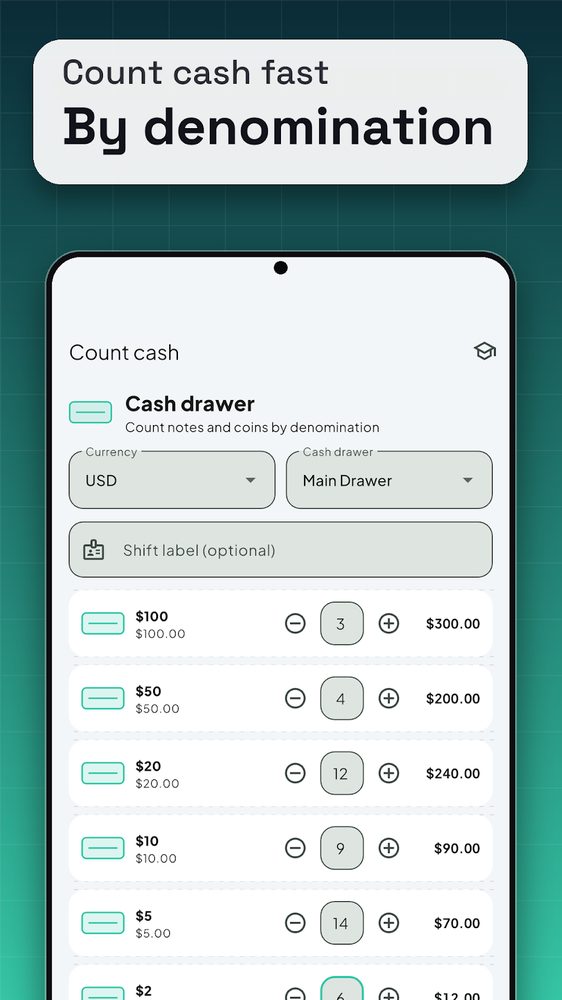
Maria closes the Main Drawer in USD at the end of the evening. On the Count tab she keeps USD and Main Drawer selected, types “Evening close” in the notes and enters quantities row by row (screenshot 1): 3 × $100, 4 × $50, 12 × $20, 9 × $10, 14 × $5, 6 × $2, 15 × $1 notes, 10 × $1 coins, 4 × 50¢, 28 × 25¢, 25 × 10¢ and 10 × 5¢. The running total adds up to $949.00.
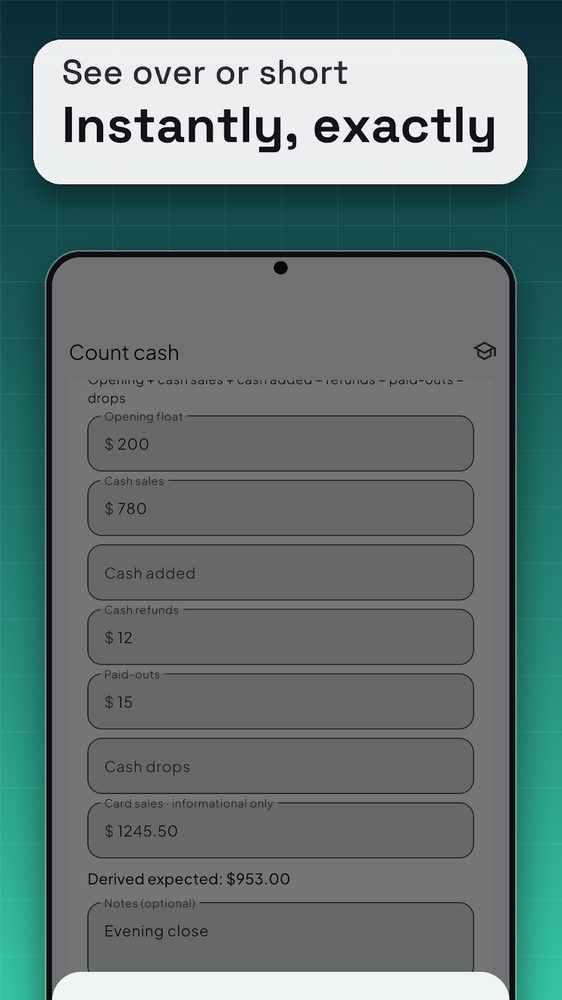
She switches on the expected-cash breakdown (screenshot 2) and enters opening float $200, cash sales $780, refunds $12 and paid-outs $15, leaving cash added and drops empty. Card sales of $1,245.50 go in the informational field and do not change the result. Derived expected: 200 + 780 − 12 − 15 = $953.00.
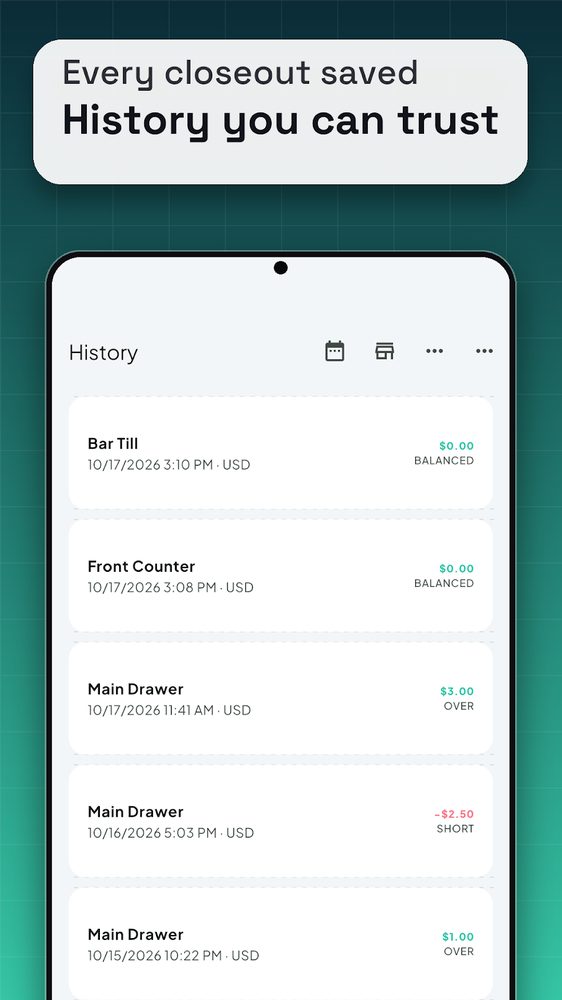
She taps Reconcile: 949.00 − 953.00 = −$4.00, short. She recounts the $5 and $2 piles, re-checks the $15 paid-out receipt, and the figure stays the same. She saves it with the note, and it appears in History (screenshot 3) as SHORT. The app does not say why; Maria follows up with her staff using the paid-out and refund slips.
Tom, shift lead: a drawer that is over after a cash drop
Tom picks the Front Counter drawer and adds the label “Late shift”. The day started with a $150 float, cash sales were $620, one refund was $8.50, $22 was paid out for milk, and $400 was dropped into the safe. Card sales of $890 are entered only as information.
Expected: 150 + 620 − 8.50 − 22 − 400 = $339.50. He counts what is physically left in the drawer, $342.50, and Reconcile shows +$3.00, over. Because the $400 drop is already subtracted, he does not count the safe money here; the safe deposit is reconciled separately. After a recount and a check of the paid-out receipt, he saves it. In History the entry reads OVER $3.00, and he can filter by drawer, date range, currency or status to find similar entries later.
Linh, market stall owner: VND, with the expected figure from a notebook
Linh does not keep a POS. She keeps a paper notebook and knows the stall should hold 2,360,000 VND. In Recona she selects VND, leaves the breakdown off and types 2,360,000 into the manual expected field (the app notes that a manual expected amount overrides the derived one). She counts: 3 × 500,000, 2 × 200,000, 4 × 100,000, 1 × 50,000 and 1 × 10,000 = 1,500,000 + 400,000 + 400,000 + 50,000 + 10,000 = 2,360,000. Reconcile shows balanced and she saves it.
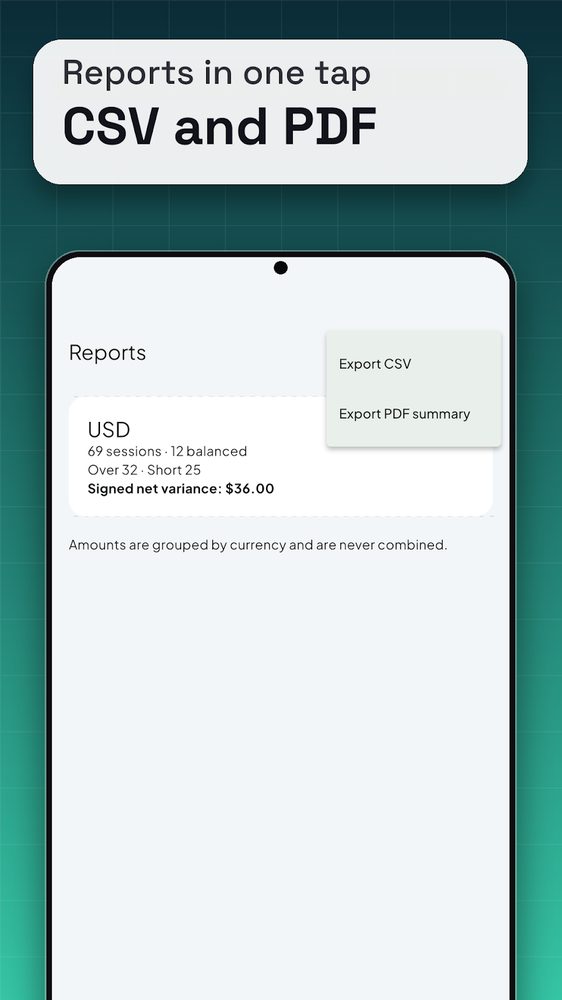
At the end of the week she opens Reports (screenshot 4), where closeouts are grouped by currency with a count of sessions, balanced, over and short, and a signed net variance. She taps the menu and chooses Export CSV or Export PDF summary to share the file. Because the report groups by currency, her VND closeouts are never added to any USD ones.
What does closing out a cash drawer mean?
A closeout connects a physical count with the activity recorded for that drawer. It is more useful than a loose total because it preserves the context: which drawer, which shift, what cash was expected, and what difference remained. Our recommendation is to treat counting, investigating, and handing over the money as distinct tasks.
Shopify’s retail guidance, updated in 2026, recommends balancing at the end of each shift when drawers or shifts are shared across operations, with differences documented by drawer. Its troubleshooting advice includes this straightforward instruction:
“Recount the cash if there is an overage or shortage.”
— Shopify Staff, Shopify
For a small shop, café, or market stall, we recommend deciding the cutoff before counting. Finish the relevant transactions, gather the matching cash report, and avoid adding a new sale to a drawer whose closeout has already begun. Use a separate handover record if trading must continue.
How should you count notes and coins?
Sort the cash into denomination groups, separate notes from coins, and enter the quantity in each group. Our rule of thumb is to use the same order every time and keep counted piles apart from uncounted money. If interrupted, restart the affected pile instead of guessing where you stopped.
Ohio University’s cash-handling guidance, accessed November 2026, calls for a denomination breakdown on the worksheet. It also says:
“Any overages or shortages should be indicated on the worksheet and investigated.”
— Ohio University, Office of the Bursar
That is institutional guidance, not a universal small-business rule. We recommend borrowing its clear separation between the count and the explanation. Record the cash you actually counted, then explain any unresolved difference alongside it.
In Recona, use the denomination quantity controls or direct quantity entry. Check the currency and enabled values before counting, especially if the device was last used for another drawer. A denomination subtotal is the face value multiplied by the quantity; the running total adds those subtotals. This is manual entry, so inspect the piles as well as the screen.
How do you work out expected cash?
Recona offers a manually entered expected amount or a breakdown calculation. The breakdown follows this relationship:
Expected physical cash = opening float + cash sales + cash added − cash refunds − paid-outs − cash drops.
Opening float means the starting cash available for change. Added cash is a later addition; paid-outs and drops represent cash removed. The app keeps card sales informational and excludes them from this calculation. These behaviors are confirmed in the source reviewed for this guide and described by the app’s counting workflow on Google Play.
Our recommendation is to confirm what your POS report means before copying a figure. If its cash total already subtracts refunds, subtracting those refunds again would distort the comparison. If its expected drawer balance already includes the float and drops, use that matching balance rather than rebuilding it with overlapping inputs.
Define the physical boundary too. Cash already moved to a safe is no longer in the drawer. Count the drawer against an expected drawer balance, then reconcile the safe transfer separately with its supporting record. Avoid mixing a drawer count with a whole-day deposit total.
What causes a till to be over or short?
Recona calculates the difference as counted cash minus expected cash. A positive difference is over; a negative difference is short; an equal count is balanced. The label describes the arithmetic, not the reason for it.
Shopify’s 2026 troubleshooting guidance identifies counting mistakes, an incorrect opening float, transactions recorded under the wrong payment type, and unrecorded cash movements as checks to make. We recommend investigating in this order:
- Check the physical count. Look for mixed denominations, stuck notes, and quantities entered into the wrong row.
- Check the starting point. Compare the opening float and drawer identity with the handover record.
- Check the transaction inputs. Match cash sales and refunds to the relevant shift; inspect any duplicated deductions.
- Check movements. Compare additions, paid-outs, and drops with their receipts or logs.
- Record what remains. State what was checked, what evidence exists, and what needs follow-up.
Do not change an expected amount merely to make the result look balanced. Our view is that an honest unresolved difference is more useful than an unexplained correction. Ask process questions before assigning blame, and follow your organization’s escalation procedure.
What controls help beyond the app?
A second count and a separate review address different questions: is the physical count right, and does it agree with the records? The University of California, Santa Cruz explains the underlying principle in its Cash Handling Guide, accessed November 2026:
“No one person should have complete control over a transaction.”
— University of California, Santa Cruz, Financial Affairs
That guide describes dual custody for critical cash-handling activities, including counting. For a small team, we recommend an independent recount before the verifier sees the original total, followed by a comparison and a documented resolution. This is a suggested staff procedure, not a built-in Recona approval workflow.
Where staffing is limited, Ohio’s guidance accessed in 2026 recommends supervisory review and oversight. A solo operator can arrange a later review with an appropriate bookkeeper or reviewer, but should not describe that as a simultaneous dual count.
Written instructions matter too. The University at Buffalo’s cash-procedure page, marked updated in 2020 and accessed in 2026, says offices handling cash:
“should have documented standard operating procedures on file.”
— University at Buffalo, Administrative Services Gateway
Our suggested written procedure names who counts, who reviews, where money goes, and where supporting records are kept. Keep actual cash secure during interruptions and handovers; a saved app record does not secure the physical drawer.
What Recona does and does not do
The Recona listing confirms denomination counting, expected-versus-counted comparison, saved closeouts, history, CSV and PDF exports, and support for several drawers. Currency presets cover USD, EUR, GBP, and VND. Source inspection also confirms configurable denominations, optional shift labels and notes, and local backup and restore.
Recona is a counting and recording aid. It is not accounting, tax, POS or audit software. As our store-listing limits put it: estimates, not accounting advice. Verify figures against your official POS and accounting records. Saving a closeout does not prove the original count was correct or certify anyone’s handling of the money.
We recommend it for owners, cashiers, and shift leads who want a dedicated count beside their existing records. If your POS already supplies the count and review workflow you need, assess whether another record would help. A paper worksheet may suit a simple handover; a dedicated count app may suit someone who wants denomination totals and local history. Choose the method your team can review consistently.
Find the app overview at Recona on NabiGame, or browse our apps and community tools.
How Recona differs from other apps
We make Recona, so read this as a description of design choices, not a verdict. Each point below is something you can check in the Play listing or in the app itself.
- Counting by denomination is the main screen. A generic calculator or spreadsheet needs you to build the rows yourself. Recona ships presets for USD, EUR, GBP and VND, shows each row’s subtotal and a running total, and lets you add custom denominations and extra cash drawers.
- The expected-cash formula is built in, and card sales stay out of it. The breakdown fields (opening float, cash sales, cash added, refunds, paid-outs, drops) produce the expected figure, and card sales are explicitly marked informational. If you already know the number, a manual expected amount overrides the breakdown.
- No account and no sign-up. You open it and count. Closeouts are stored in a local database on the device and are shared only when you export or share a CSV or PDF file.
- Few permissions. The Android manifest we reviewed requests internet access, network state and vibration. It does not request camera, contacts or location. The internet permission exists because of ads, consent and analytics services, so “offline” means the counting works without a connection, not that the app never touches the network.
- Interrupted counts survive. The in-progress count is saved as a draft shortly after each change, so a phone call or a customer does not wipe the piles you already entered.
- Reports never mix currencies. Totals are grouped per currency, which matters if one device is used for more than one currency.
- It is free with ads. We show banner ads on the History and Reports screens in the source we reviewed. We have not verified other monetization details here, so check the store listing for the current model.
When to pick something else. If your POS (Square, Shopify POS or similar) already runs cash drawer sessions with expected cash and staff sign-off, use it as the system of record; Recona does not read POS data and has no approval workflow. If several people must enter data on different devices, or you need audit trails and permissions, a shared spreadsheet or business software fits better; Recona keeps records on one device. If you only need a one-off total of a handful of notes, a paper worksheet is enough.
How do you get started in three steps?
- Prepare the drawer. Choose the currency and cash drawer in Count. Check denomination settings, add a shift label if useful, and gather the matching official report.
- Count and reconcile. Enter quantities, inspect the running total, then enter expected physical cash or use the breakdown. Tap Reconcile and review the difference. Recount and investigate before saving.
- Save and preserve context. Save the closeout, review it in History, and export a CSV or PDF when needed. Keep supporting receipts and any reviewer sign-off with your business records.
Does Recona work offline, and where do records go?
The Play listing checked in November 2026 confirms offline operation and no account requirement. Cash records stay on the device unless explicitly exported or shared. Local source inspection confirms the counting and database workflow is designed for offline use.
Keep that claim specific: the source also integrates consent, advertising, and analytics services. Local cash records do not mean every component has no network activity. Consult the listing’s privacy information when deciding whether the app fits your workplace’s device policy.
We recommend keeping an intentional backup outside the working device and checking that the file is accessible. Recona’s restore replaces current local records, so review the confirmation before proceeding. Export only to a destination appropriate for business records.
For related product work, see our development services. If a closeout workflow needs a clearer explanation, tell us where you get stuck.
FAQ
Is Recona a cash register or POS replacement?
No. Recona helps count and record physical cash differences; it does not replace the system that records your sales or your accounting records. Use those records to establish the expected amount.
Should I add card sales to expected cash?
No, card sales are not physical notes or coins in the drawer. Recona’s breakdown keeps card sales informational only. Reconcile card activity through the relevant payment records separately.
Does a short drawer mean someone took money?
No, the difference alone does not establish a cause. Recount and inspect the opening float, payment types, refunds, and cash movements before reaching a conclusion.
Can Recona verify a second person’s count?
Do not treat it as a staff approval system. Arrange the independent count and reviewer sign-off through your own procedure, then keep that evidence with the closeout.
Do I need an account or internet to count?
The Play listing confirms offline use and no account requirement. Cash records remain local unless exported or shared. Plan backups separately and distinguish local records from advertising and analytics activity.

Comments
Loading comments…